
Controls
You control Undermine Squad like a modern game: WASD or the arrow keys, a few action keys and the mouse. Underneath sit the original controls with their double keys and automatic climbing and hangling. Keyboard and mouse mix freely.
The most important keys are gold.
- Walk: hold A and D or ← and →. Let go to stop.
- Jump: W, ↑ or Space. In front of an entrance the digger goes in. Jumps always carry full walking speed.
- Dig: E (or Ctrl). The digger digs diagonally down in the facing direction; A and D steer, S stops. More in Digging and blasting.
- Throw: Q throws the carried item. While grabbing a vehicle, throw controls it, for example unloading a lorry or firing a catapult.
- Crew: Tab and ⇧ Tab switch diggers, 1 to 9 select directly.
Double keys
Section titled “Double keys”Press twice quickly (within about 0.28 seconds) for context actions:
| Double | Effect |
|---|---|
| S S | build at a construction site; grab or release a vehicle |
| E E | activate the carried item: light a flint, open a construction kit, lay a line; at a tree: chop it |
Moving on its own
Section titled “Moving on its own”- Climbing: walk into a wall and the digger climbs it and over the edge. The key away from the wall lets go.
- Hangling: along a ceiling the digger hangles. S lets go.
- Swimming: in eight directions. Double jump at the surface is a dolphin jump.
- Inventory: a digger carries one item (two from Corporal). Items are picked up by walking over them.
Hold or tap
Section titled “Hold or tap”Holding is the default: the digger walks as long as you hold the key. If you like it like the original, switch to tapping in the settings (or with F4): press once and the digger keeps walking until you press S.
| Action | Effect |
|---|---|
| Left click on the terrain | walk there; the digger finds the way (walk, jump, climb, hangle, through tunnels) |
| Left click on one of your diggers | select it |
| Double left click on a target | the fitting action: chop, build, grab, enter, pick up, dig there |
| Right click | context menu with everything you can do here |
| F (classic: Special2) | context menu at the selected digger |
| Drag from the digger or the inventory | throw the item (far) or drop it (near) |
| Drag an item onto a building or a lorry | put it inside |
| Drag an item onto another digger or his crest in the crew bar | hand it over (a distant digger walks over first) |
| Drag a vehicle | grab it and push it to the target |
| Drag a frame | select several diggers, hold Shift to add more |
| Mouse wheel | switch crew |
Context menu
Section titled “Context menu”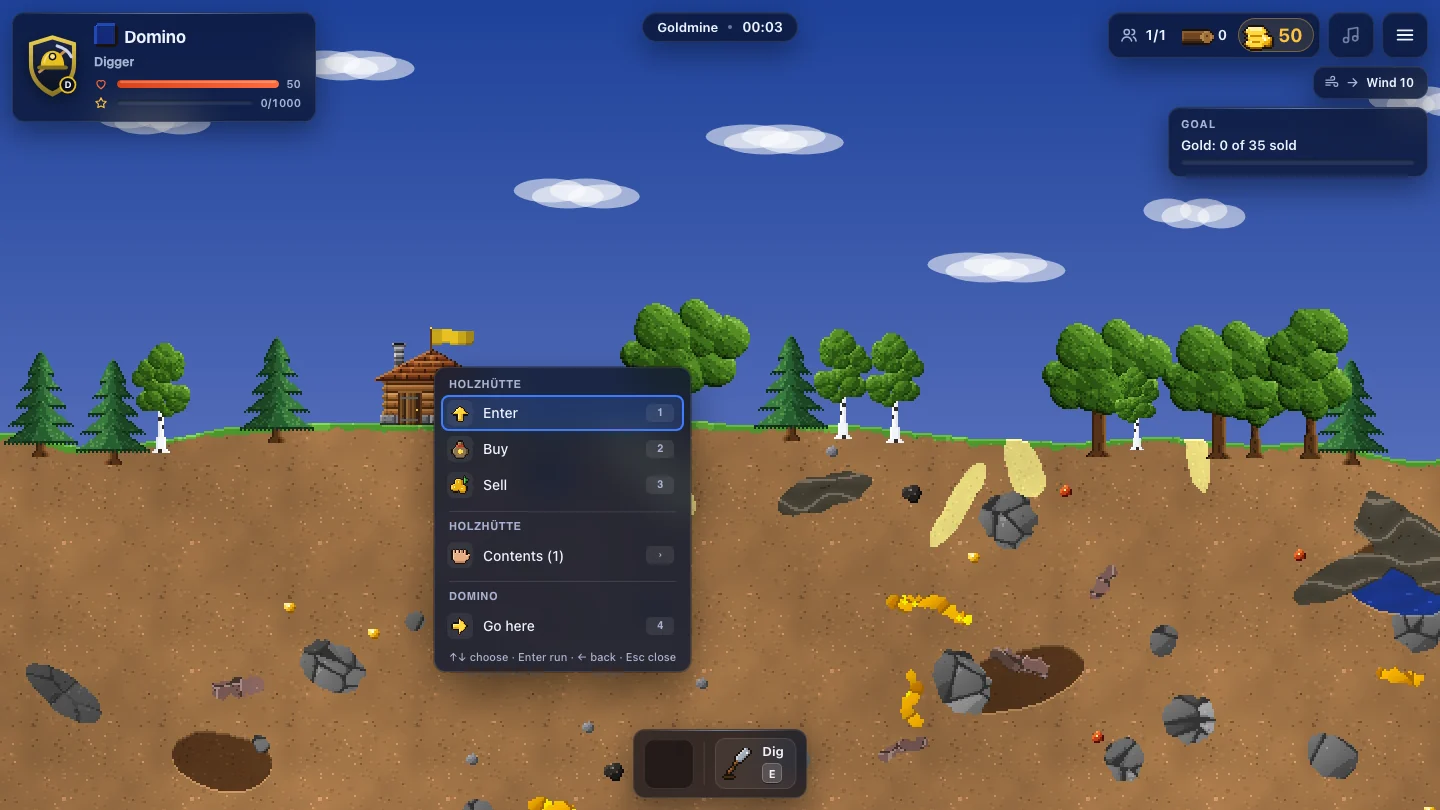
A right click opens a menu at the pointer. At the top is what you can do with the object underneath (for example Chop down, Grab, Pick up), then the building (Enter, in your own base Buy and Sell), then the selected digger (Go here, Dig here, Throw, Drop, Push here). From the rank Squad Leader on, orders for the squad are added: follow, dig here, fetch material.
Use it with the mouse or the keyboard: ↑ ↓ choose, Enter runs the entry, 1 to 9 pick directly, Esc closes. On phones and tablets a long press opens the same menu.
By key: F opens the menu at the selected digger; in the classic layout it is the Special2 key, as in the original. F again or Esc closes it. It has submenus, marked with ›:
- Contents of a building: take single items out.
- Give to …: hand the carried item to a squad mate (with only one mate his name is in the entry).
- Orders of the squad leader: follow, dig here, fetch material.
- Chunk mode on or off (from Private).
→ opens a submenu, ← goes back.
Pathfinding
Section titled “Pathfinding”One click is enough, even if the way is not straight. The digger jumps over edges, climbs walls, pulls itself over the top, hangles along ceilings and walks through tunnels. It finds its way out of a blast crater; if the walls overhang, it digs its way out diagonally.
Floors and shafts are no obstacle either (transfer zones as in the original):
- Staircase and tower: it walks in and comes out on top or one floor lower; from the roof it climbs down through the hatch.
- Elevator and castle elevator: it calls the case, gets in, rides to the right floor and gets out.
- Own gates and drawbridges: from inside it grabs the tower, opens the gate or lowers the bridge and walks through. From outside it cannot reach the tower; it never opens enemy gates.
Original layout
Section titled “Original layout”If you know Clonk from back then, set Key layout to Classic (original) in the settings. Then the old 3 × 4 key grid (“Keyboard 1”) applies, plus arrow keys with Ins/Home/PgUp and the number pad. On a German keyboard Y sits where Z is.
Undermine Squad 0.1 · „Clonk“ is a registered trademark of Matthes Bender. Undermine Squad is an independent game.